> ## Documentation Index
> Fetch the complete documentation index at: https://docs.decodahealth.com/llms.txt
> Use this file to discover all available pages before exploring further.
# Invoice Management
> Manage automated patient outreach for outstanding balances, track invoice statuses, and use bulk actions.
Navigate to **Billing > Invoices** to access invoice management.
## Invoice Management
Navigate to **Billing > Invoices** to manage automated patient outreach for outstanding balances.
### Invoice Metrics
At the top of the page, four metric cards show the count of invoices in attention-requiring states:
* **Failed:** Invoices that could not be delivered (invalid phone, email bounce).
* **Expired:** Patients who completed the full rule set sequence but still have a balance.
* **Paused:** Patients with manually paused outreach.
* **Will Fail:** Invoices scheduled to send in the future that are predicted to fail.
### Invoice Table
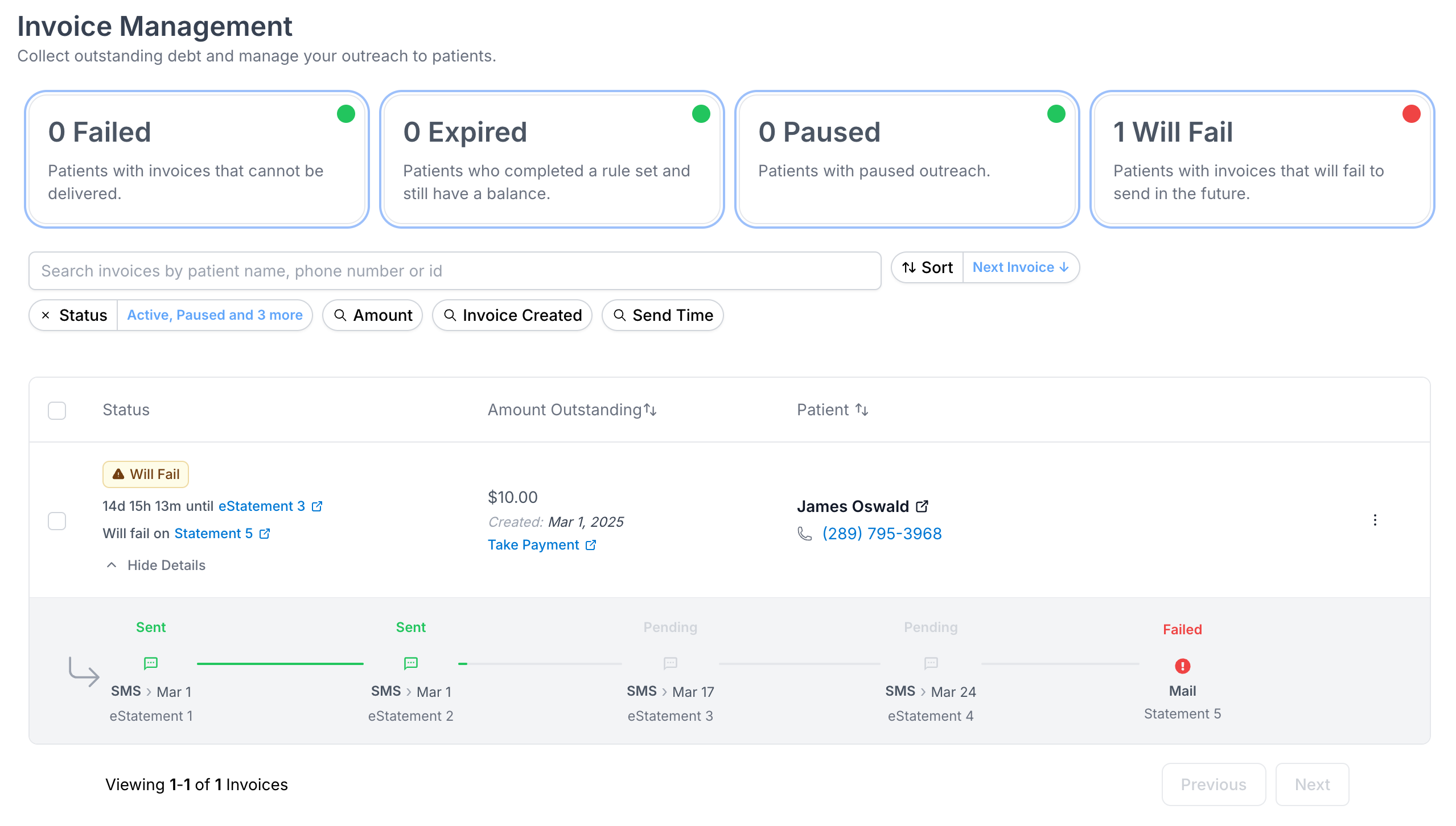 Each row represents an invoice set (a patient's collection of outstanding charges being invoiced). The table shows:
* **Status:** The current state of the invoice set with color-coded badges.
* **Amount Outstanding:** The total balance remaining across all linked charges.
* **Patient:** Patient details and a **Take Payment** link to go directly to the payment page.
* **Actions:** Context-specific actions for managing the invoice set.
Click **Show Details** on any row to expand the **Invoice Timeline**, which displays every message sent, patient response, and status change in the collection sequence.
### Invoice Actions
Available actions depend on the invoice set's status:
* **Write Off** -- Marks the outstanding balances as uncollectable (available for Active, Paused, Expired, Will Fail, Failed).
* **Send to Collections** -- Escalates the invoice to collections (available for Active, Paused, Expired, Will Fail, Failed).
* **Change Rule Set** -- Switches the automated sequence to a different rule set.
* **Pause** -- Temporarily stops all automated outreach (available for Active, Will Fail, Failed).
* **Resume** -- Restarts paused outreach.
* **Cancel** -- Permanently stops all outreach for this invoice set.
### Bulk Actions
Select multiple invoice sets using the checkboxes, then use the bulk action bar to apply Write Off, Send to Collections, Change Rule Set, Pause, Resume, or Cancel to all selected invoices at once.
### Invoice Filters
Each row represents an invoice set (a patient's collection of outstanding charges being invoiced). The table shows:
* **Status:** The current state of the invoice set with color-coded badges.
* **Amount Outstanding:** The total balance remaining across all linked charges.
* **Patient:** Patient details and a **Take Payment** link to go directly to the payment page.
* **Actions:** Context-specific actions for managing the invoice set.
Click **Show Details** on any row to expand the **Invoice Timeline**, which displays every message sent, patient response, and status change in the collection sequence.
### Invoice Actions
Available actions depend on the invoice set's status:
* **Write Off** -- Marks the outstanding balances as uncollectable (available for Active, Paused, Expired, Will Fail, Failed).
* **Send to Collections** -- Escalates the invoice to collections (available for Active, Paused, Expired, Will Fail, Failed).
* **Change Rule Set** -- Switches the automated sequence to a different rule set.
* **Pause** -- Temporarily stops all automated outreach (available for Active, Will Fail, Failed).
* **Resume** -- Restarts paused outreach.
* **Cancel** -- Permanently stops all outreach for this invoice set.
### Bulk Actions
Select multiple invoice sets using the checkboxes, then use the bulk action bar to apply Write Off, Send to Collections, Change Rule Set, Pause, Resume, or Cancel to all selected invoices at once.
### Invoice Filters
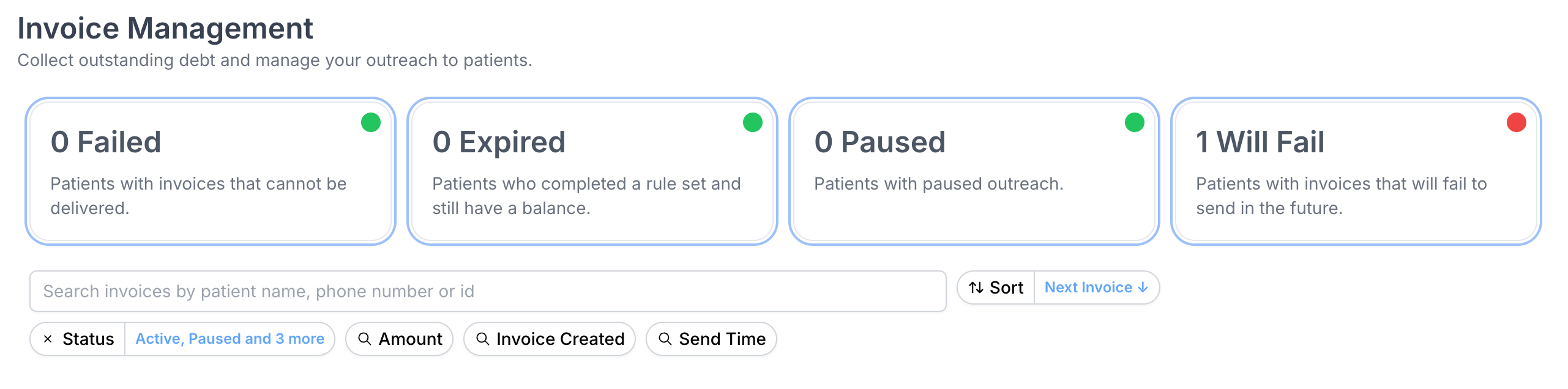 Filter the invoice list by:
* **Search:** Patient name, phone number, or ID.
* **Status:** Multi-select from Active, Paused, Cancelled, Expired, Paid, Will Fail, Failed.
* **Amount:** Dollar range filter.
* **Invoice Created:** Date range for when the invoice set was created.
* **Send Time:** Date range for when the next message is scheduled.
* **Rule Set:** Filter by which rule set is being used.
Filter the invoice list by:
* **Search:** Patient name, phone number, or ID.
* **Status:** Multi-select from Active, Paused, Cancelled, Expired, Paid, Will Fail, Failed.
* **Amount:** Dollar range filter.
* **Invoice Created:** Date range for when the invoice set was created.
* **Send Time:** Date range for when the next message is scheduled.
* **Rule Set:** Filter by which rule set is being used.